Staff Product Designer · 10+ Years · B2B/B2B2C · Design Systems · 0-to-1
I turn ambiguous product and brand problems into systems that scale.
Part strategist, part systems-builder. I find the gaps between product, brand, and engineering, and close them, so teams can move with more clarity and less friction.
“She is a strong collaborator who communicates visual ideas clearly to engineers, executives, and everyone in between, and she brings a level of care and empathy to her work that shows up in both the product and the team around her. Her attention to detail made everything she touched easier to build and better for the end user”
Trey, Director of Product
“The way she approached design problems was always on point, and she always had something new or interesting to share. She is very knowledgeable in terms of research, testing, and general UX/UI design, and is very willing to share it with the team.”
Jose, Senior UX/UI Designer
“Theresa made such a huge impact during the time we worked together. She was incredibly hard working, highly organized, and an active communicator, and the design artifacts she created made the transition from design to engineering easy.”
Tim, Senior Engineering Manager
“She brought a thoroughness to every project that we all came to rely on. Whether she was working on a small feature or an entire app re-platform, she collaborated so well with engineering and knew how to keep the complexity at bay.”
Tommy, Product Manager
“Theresa possesses all of the skills a product leader needs from a user experience expert and much more. Her ability to create deeply thoughtful design work and communicate its value was unmatched to many other designers I've worked with.”
Rob, Product Manager
“Theresa is a creative force: richly talented, collaborative, ambitious, and hard-working. She has an uncanny ability to combine customer interviews, market research, and design trends to distill user intent and design purpose.”
J.R, UX Director
“Theresa worked on a crucial project and was extremely competent, organized, creative, and most pleasant to work with. I would highly recommend her to any organization in search of her skill sets, and I would hire her again without question.”
Boyce, Freelance Client
“Theresa was not only an amazing multi-disciplined strategic designer, but also a collaborative team player who leads by example. She is reliable, confident, professional, a good presenter, and knows when and how to assert herself.”
Allison, Director of Design
About
I'm a hands-on product design leader who helps startups and growing companies turn complex products into clear, cohesive customer experiences. I work closely with customers and cross-functional teams to find gaps, strengthen product and design foundations, and build systems that help teams move faster without losing consistency or trust. My work spans product strategy, UX, design systems, brand, and workflow design, with a focus on B2B and B2B2C SaaS. I enjoy the challenge and creativity of ambiguous spaces, getting to the real problem beneath the first request, and turning insights into practical, shipped solutions.
If you're looking for a strategic product design leader to bring that next level of clarity and care to your product and organization, I'd love to connect.
Clients want to be able to respond to subscribers in both a prompt and efficient manner but have limited control in today’s platform. Currently, Attentive provides one default autoresponse option accessible from Settings. It fires when any unsolicited response comes through. Unsolicited responses can take many forms, including customer questions, typos, opt-outs, and more. Problem is, it’s not very smart at discerning what’s what. While keyword configuration could be helpful, it can only be configured on the backend by a technical account manager (TAM) and is not accessible to clients.
Solution
Autoresponse setup and management place
Previously autoresponses were configured on the backend, which means clients were unable to create, modify, or manage keyword set up. In this solution, users are able to set up and manage keywords from the main navigation.
The creation of autoresponses is heavily geared towards being able to create things like FAQs. In interviews, most clients already had a good sense of what these were for their businesses. Having paths set up to handle these repetitive inquiries would provide immediate resolve for customers and prevent requests from having to be handled by a support agent.
How it works
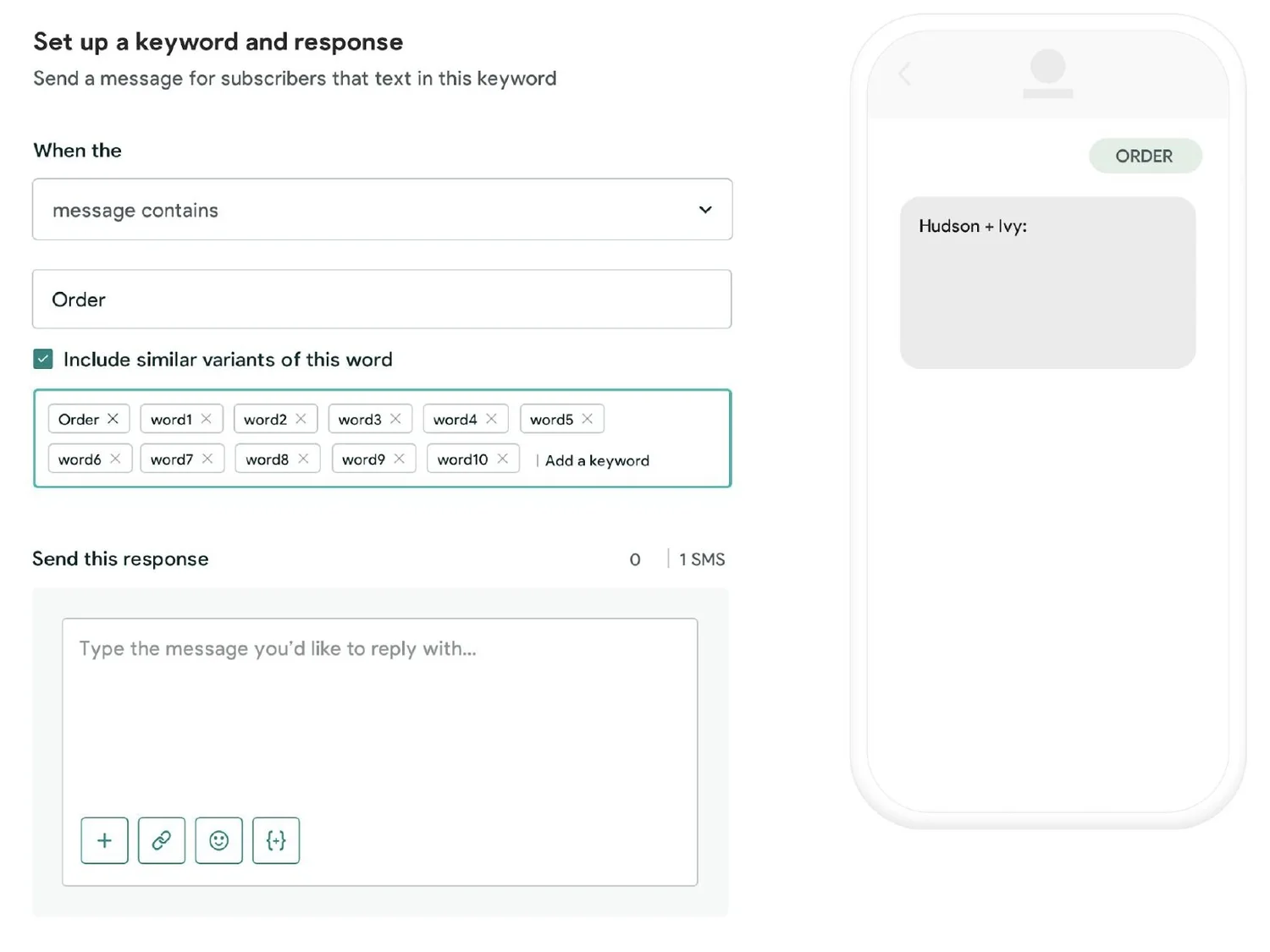
When the user clicks the “Create Autoresponse” button, they’ll be brought to the initial configuration view. The config would be pre-populated with a default option, but users would have the ability to select from the following:
Message contains
Message starts with
Message is exactly
As the user types in the keyword, it will be reflected in the visual, note that the first keyword typed acts as the default title of the Autoresponse. Once the user has typed in the word they can elect to “Include similar variants of the word”. Depending on what we can leverage, the idea is that we would have some kind of fuzzy matching capability wherein we could suggest the words to include.
As a marketer, I want to be able to set up an automatic reply when someone texts in a keyword and have it account for similar words
Having fuzzy match enabled will automatically include similar variants of the word, with the ability to remove or add additional ones.
As a marketer, I want to be able to have the flexibility to set up an automatic reply when I’m in Journeys...
Autoresponse creation from Journeys
In conversations with users, it was clear that not all scenarios of creating a Keyword would be as linear and planned out. There was a desire to be able to create an autoresponse while in the context of Journeys, without having to actually leave Journeys. Journey is a feature within the Attentive platform that allows users to map the path they want subscribers to take on a visual canvas, think of it as a visual form of IFTTT.
Leveraging the existing Create configuration we have in Autoresponses, we took the same interface and placed it in a modular sidecar. The sidecar is called on in Journeys when a user selects the option to set up an FAQ.
Sending a text message can translate into one of three paths in a journey: a Promotion, which is a general blast that does not solicit a response; a Quiz, which is a 2-way message step; and an FAQ, which is how we were marketing Autoresponses. To help users along, each of these objects was paired with an intent: Promote was associated with a Campaign, Learn was associated with a Quiz, and FAQs were associated with Educate.
Surfacing this step in the creation of a Journey was essential, as the lines between the 2-way message step and FAQs were very fuzzy, since they were both a form of autoresponse. Framing them as a Quiz and FAQ was helpful in communicating the purpose of each one. A 2-way message step or Quiz was defined as a client-solicited message which has a multiple-choice journey with prescribed routes for each response, whereas FAQs were single replies triggered by inbound messages that contain keyword triggers.
Connected experiences
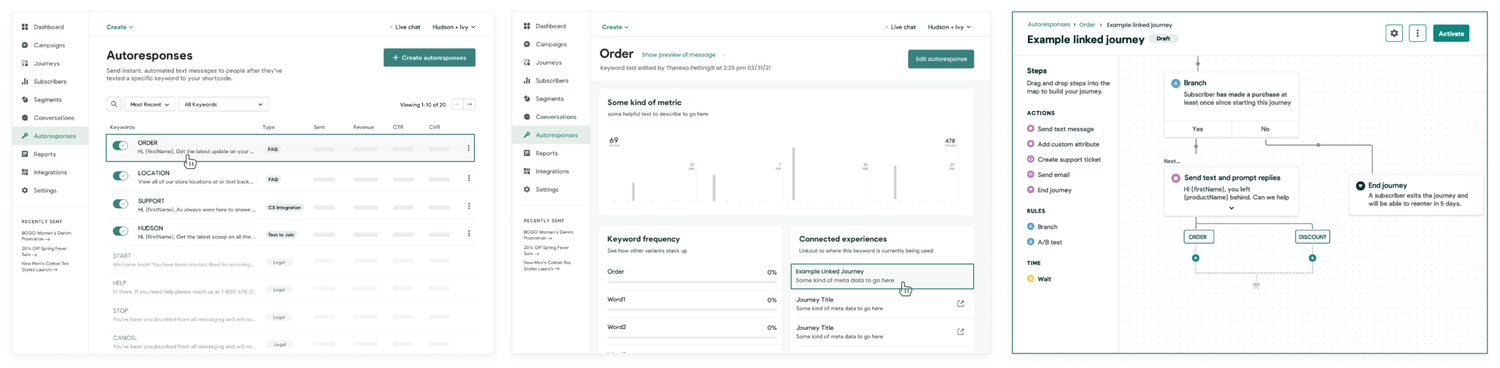
When a user returns to the Autoresponses page, they see a log of all autoresponses that have been set up. Clicking on the row item will bring them to the keyword’s individual page. There, they’ll be able to see some high-level metrics as well as links to where the keyword is being utilized via “Connected experiences”.
Users had expressed a desire to be able to create Keyword generated replies while in the context of creating a Journey, but they also wanted to be able to know and track what keywords were being used.
In the current experience, the only way they were able to access Keywords that were made in the context of a Journey was to open the actual workflow for that Journey. With connected experiences, a user is able to access a central place for all their keywords and then link directly to where it is being utilized.
Path from viewing a Keyword detail page to viewing a connected experience — example above is from a connected Journey.
Looking towards the future
While the previous concepts relied heavily on manual solutions such as Keyword recognition and configuration, I wanted to explore how we might begin to leverage capabilities like sentiment analysis and machine learning. These were capabilities we were not currently leveraging, and while it was unlikely that this would be pursued in the next quarter, I at least wanted to plant some seeds…
As a marketer, I want to be able to have a way to know which conversations are important and which are not
Our current Conversations page (not shown) is vastly underused and for many, completely useless. The page is a log of all the inbound responses that come into the client platform. There’s no filter and no way to see the context of any incoming reply.
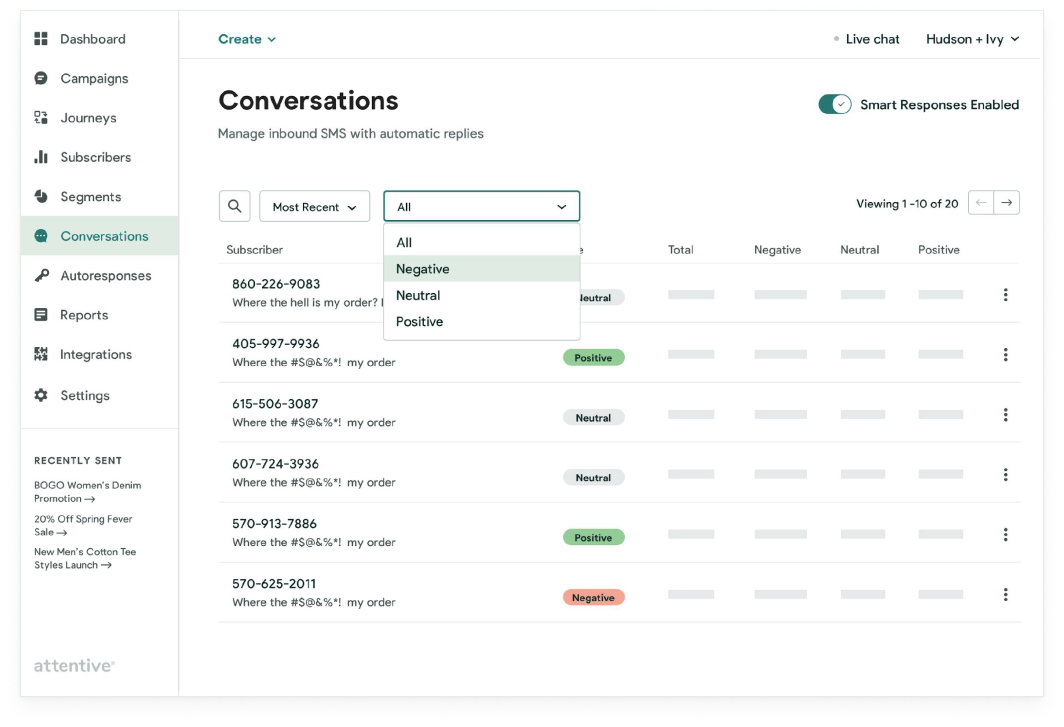
In the updated flow (shown below), a user is not only able to get an overview of all the messages coming in but is able to filter by whether the message is negative, positive, or neutral, as well as see some high-level metrics at a glance. They’re then able to take it a step further to set up “smart responses”.
From the index view of Conversations, you would be able to see high-level filtering of conversations based on sentiment (negative, neutral, positive) and would be able to “enable” smart responses. Sentiment analysis models focus on polarity (positive, negative, neutral) but also on feelings and emotions (angry, happy, sad, etc), urgency (urgent, not urgent), and even intentions (interested v. not interested).
Depending on how you want to interpret customer feedback and queries, the idea here is that you would be able to define and tailor your categories to meet your sentiment analysis needs.
Smart responses
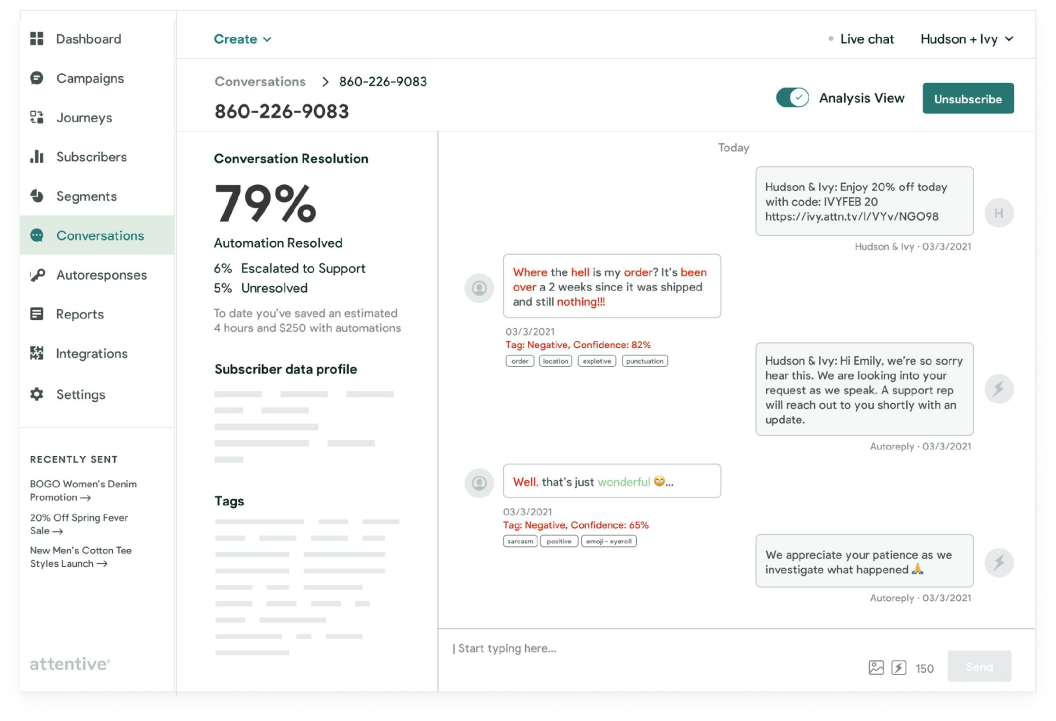
When a user clicks on a subscriber row from the Index view, it will lead to the subscriber detail view…
On the subscriber detail view (shown above) you’re able to see:
History of messages from that subscriber
Some kind of overall “health” or engagement score
Metric breakdowns
Subscriber data: profiles, associated tags
What messages were solved by automation (indicated by the thunderbolt avatar by messages)
An optional “Analysis” view that shows you the degree of confidence in message classification
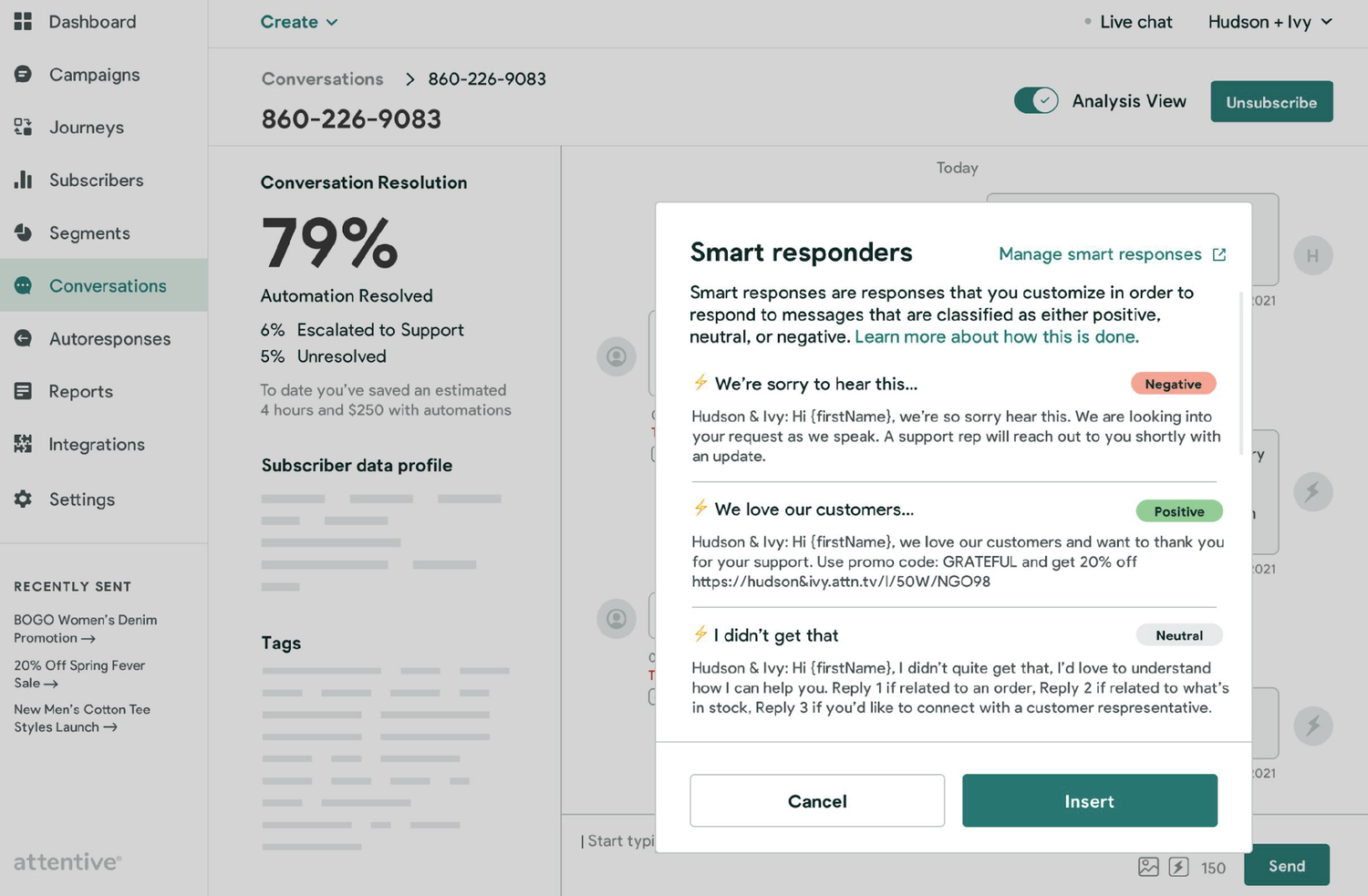
As a marketer, I want to be able to leverage ML in order to create canned responses to which I can apply to certain types of messages
Smart responses are pre-drafted messages accessed directly from the message text area on the Subscriber detail view. When a user selects the thunderbolt icon, they’ll trigger a window that presents options for inserting a smart responder that they are able to customize.
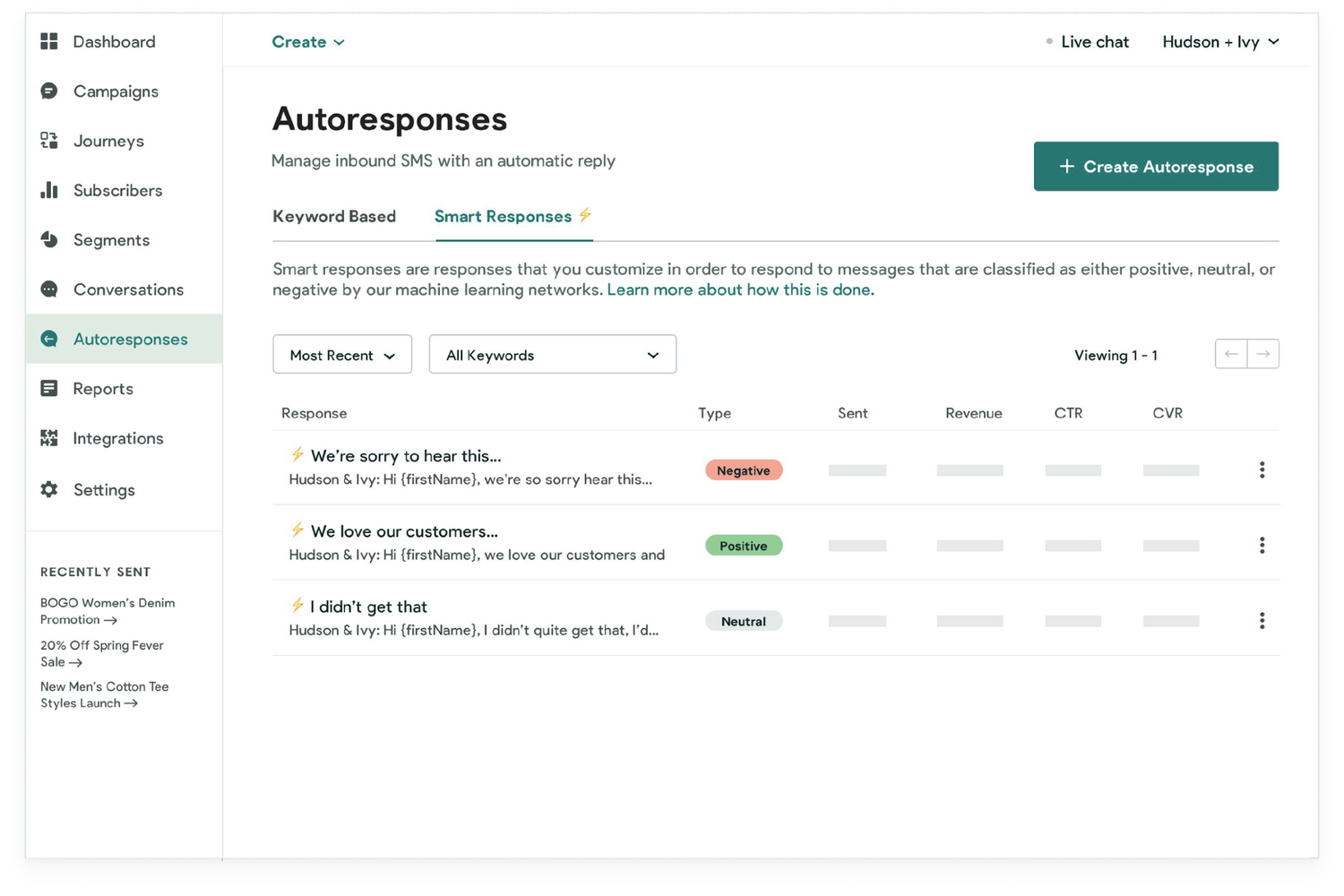
In the beginning, when the model is still green, the idea is we start with some basic classifications: negative, positive, and neutral. As time goes on, the model gets “smarter” at analyzing conversations.
Smart responses would be created and managed in the Autoresponses tab, adjacent to Keyword-based autoresponse config.Read the full case study
Objective
Explore ways in which we can leverage automation effectively so that client support teams are not inundated with messages. Design a client-facing config that will enable clients to create, modify, and manage keywords.
Users: Attentive Client Strategy Managers, Digital marketers
Managing unexpected replies effectively can:
Help clients filter inbound messages with smart responses
Boost brand loyalty and drive future revenue
Create a better user experience by not leaving subscribers hanging
Loop in human agents when automation fails
Reduce the burden off of client CX teams by handling repetitive requests
Pain Points
Limited customization and access
Autoresponse is one size fits all and is not flexible enough to answer questions in an efficient manner
No reporting around what unsolicited messages are coming in and at what frequency
Clients are left in the dark as to how to improve
No filtering, sorting, or alert capability to help clients separate what responses need intervention versus the ones that are just noise
Approach
I first needed to understand how clients were moving through the Attentive platform. How were they performing their tasks? And at what points does it make sense to surface keyword configuration? I mapped out the existing touchpoints where keyword configuration or any kind of response management came into play…
Default Autoresponder Typically set up with the help of a CSM during onboarding, clients have access to edit this message from the location of Settings. Its purpose is to handle all unsolicited messages that come in. It’s the umbrella solution for all unexpected messages and can be turned off or on at will.
Legal Keywords Keywords required by the TCPA (i.e. STOP, opt-ins, and re-subscribes). These need to be crafted with the assistance of the Client Strategy Manager (CSM) as there are certain carrier restrictions that apply. Clients don’t have access to modify due to possible legal repercussions.
Conversations Clients are able to view replies and respond directly to subscribers on the Conversations page. Only responses are visible so there is trouble with mapping together context. Messages that come through are often accidental texts, but since there’s no filter, users sort through the noise.
Texted a Keyword Trigger (limited access) Client-facing config that allows clients to set up an Autoresponse based on a specific keyword. This is only accessible from the context of creating a Journey, supports exact match only, and was built for the purpose of testing the adoption rate of conversational use cases.
Drafting a Glossary A large part of the initial efforts behind this work was making sure the team was aligned on how we were defining the words being used in our discussions. Many terms were being utilized interchangeably which was confusing for the team. In response to this, I drafted a glossary that I included in the research deck. Doing this enabled us all to get on the same page.
Default Autoresponder This is referencing the default autoresponder that is accessible via Settings. The form factor of this is generally set up by Attentive but can be modified, turned on/off by Clients.
Triggers Actions that take place before a user enters an automation path (also referenced at times as “Journeys”). These can optionally work with tags or actions that cater to specific behaviors or characteristics.
Subscriber Attributes Subscriber attributes contain specific information about your subscribers, such as first and last name, gender, and geographical location.
Autoresponse Predefined responses configured via keywords to communicate via an automatic reply with customers across specific scenarios. Used to communicate acknowledgment, direction & next steps.
2 Way Message Step Client to Subscriber message wherein pre-set responses are solicited via keyword entry from a subscriber.
Keywords A word that people text to an SMS shortcode that corresponds to a specific mobile messaging campaign. They are used to trigger responses, opt-in/opt-out flows, and tag assignments. (Also referred to as “Message Specific Autoresponses”, “Autoresponse Beta in Journeys”)
Research
Competitive Research
We looked at over 30 competitors across the SMS and broader Email/CRM space in a time box of 1 week. Our goal with this research was to explore how others were handling autoresponse functionality. What were they calling it? Where along the journey were they exposing it? And what role did other features play?
It was important for us to understand what pre-conceived notions or mental models were already established. By looking at a vast sample of competitors, we could begin mapping patterns and identifying themes. We gathered our findings in Miro and distilled the following insights:
In general
Most competitors were CX driven and strove to provide omnichannel solutions for clients
Provide some form of reporting
Offer some form of advanced segmentation or behavioral profiling
Leveraged filters, triggers, and tags
Location
7 competitors bucketed autoresponse under a wider umbrella of “Automations”
3 were located within Journeys or Flows
5 were located within the Admin/Settings
2 had them located in the context of Campaigns
Use cases
Opt-in, Opt-out
Away messages
Help or Support
Quizzes and Surveys
FAQs
Other names
“autoresponders”
“Automatic reply”
“Automation Rules”
“Answers”
“Create bot”
Edge case handling
From a technical perspective, I did some sleuthing with respect to questions that our team might have, specifically engineering. Having insight into how other products had solved some of the questions that were coming up gave our team more confidence as we moved towards designing a solution.
No recognition of open-ended answers
Filter options for Keywords: Message is, Message contains, Message contains the whole word, Message begins with, etc…
Set a fixed response based on the rules you assign in the template. Define up to 50 responses.
As soon as the keyword is identified, response is triggered and matches across the rest of the possible response messages stop.
Top-level keywords and sub keywords: under each keyword, you can have several sub-keywords called triggers, which automatically respond to common queries and requests for information.
A keyword, also known as a “text word”, is a word or phrase that people can text to an SMS shortcode or phone number to trigger an autoresponder text message.
If the same keyword is on multiple triggers, it enters the user in all the journeys that utilize that keyword.
If a contact includes more than one word in their incoming message, only the first word is accepted.
Single-word keywords are the only ones used, and only fire the autoresponse when it is the only word in an incoming message.
Triggers can be anything from a single letter to a short phrase. Must be one word, no spaces, and contain both letters and numerals, they are not case sensitive.
Triggers are used for signups, surveys, and competitions.
Automated replies are designed for hundreds of keyword variations, with a limit of one autoresponder text message associated with a keyword.
Adjacent features
It’s helpful to know what other features products mentioned in their documentation to better understand what language they are using and what other supporting features we might need to consider:
triggers, segment analysis, chatbot, shortcodes, reports, rules, tags, insights, templates, trigger filters, integrations, 3rd party data, keyword management, dynamic field insertion, chatbox, dynamic variables, AI, sentiment analysis, context-aware, and much much more!
Social listening
We conducted a social listening exercise wherein we looked at various internal sources — Gong, Canny, Jira, etc — over the course of 1 week as a means to hear what our clients have been saying related to Autoresponses.
Data
Want to see metrics associated with automation
Revenue from click-through conversion rate
Costs associated with specific autoresponse
Most successful keywords
Most frequently asked questions/issues
Time to resolution
Number of people that did/did not respond
Number of messages sent post-autoresponse
Number of times an auto-response was sent
Pains
CSM needs to submit a ticket to Eng when creating or editing keywords
Fatigue logic with default-responder and CX opt-in messages
Use Cases
Accidental inputs, order status, coupon/promotions, product details like size and availability
Perception
Clients see value in having both automation and live agent takeover depending on the context
Most saw value in being able to leverage their own CX team to handle situations, ensuring calls would be handled by those trained with their brand tone and equipped with product knowledge
Automation is generally seen as valuable since it delivers immediate resolution the moment that subscribers need it. It also frees CX agents to work on other higher-order customer issues.
People do not always speak of auto-response directly but through the lens of what they are trying to achieve or through supporting features such as triggers or keywords
People generally believe that incoming messages from customers are not positive. Aka: Where’s my order?
People think of Autoresponse as having its own place within the UI, or somehow affiliated with Campaigns or Conversations
Interviews
7 CSMs and 6 clients
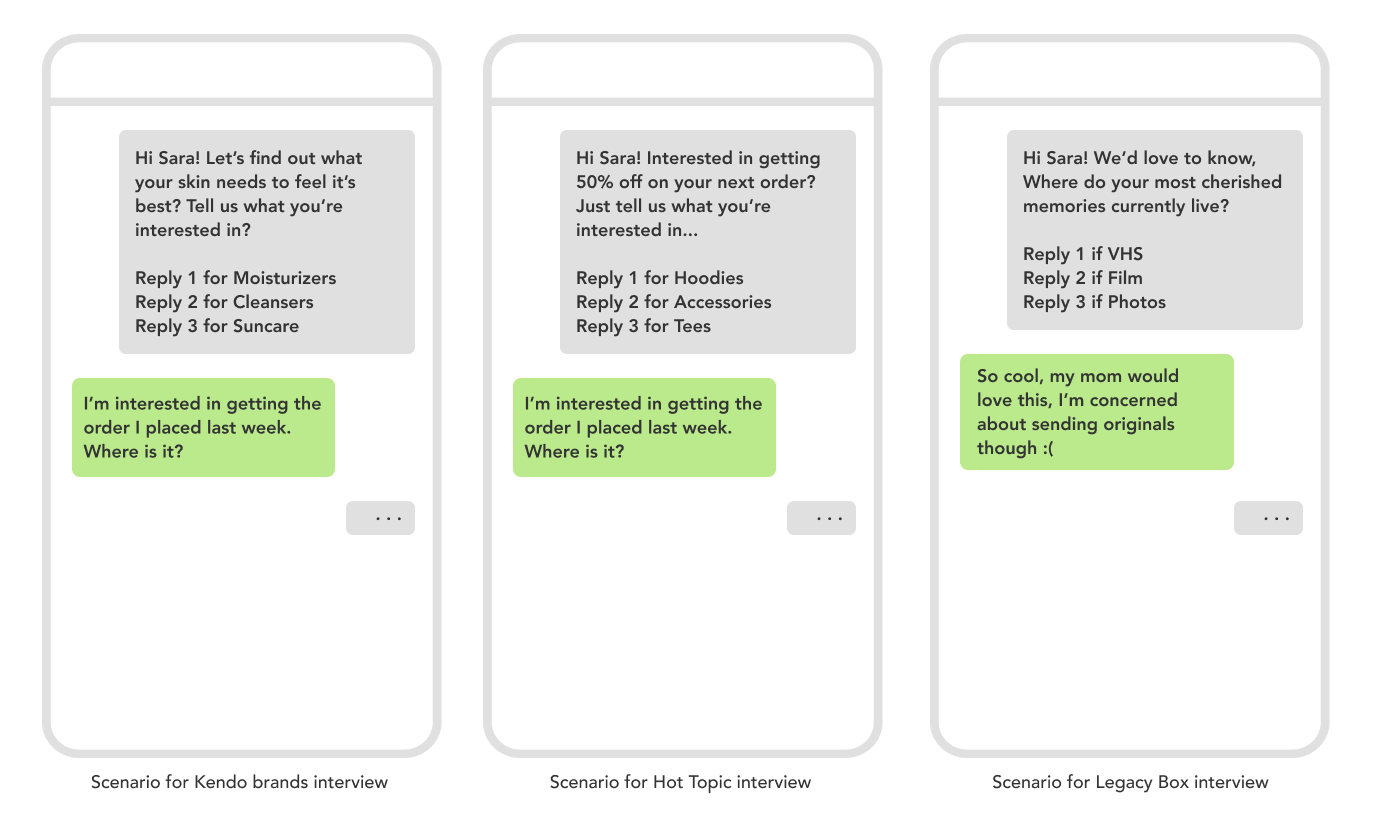
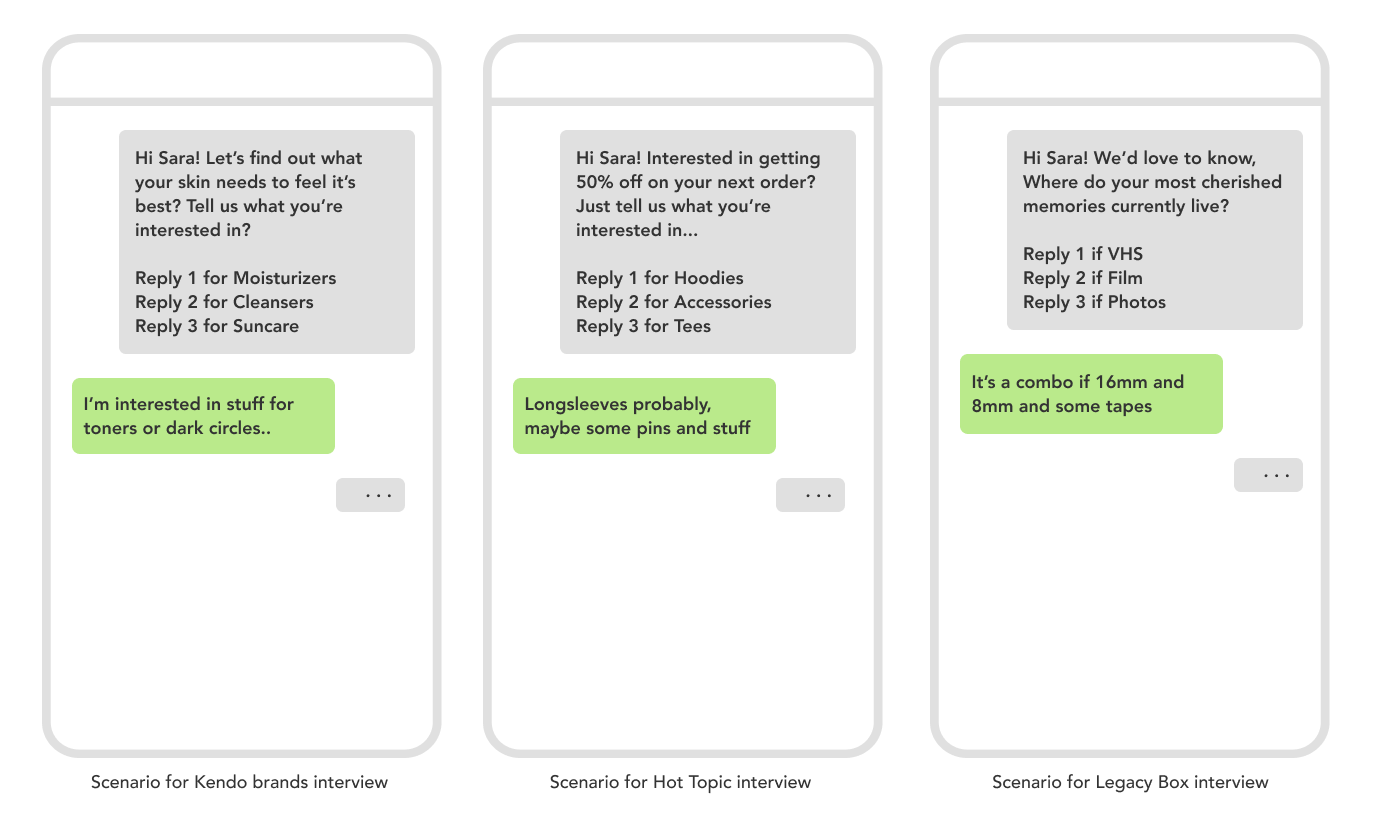
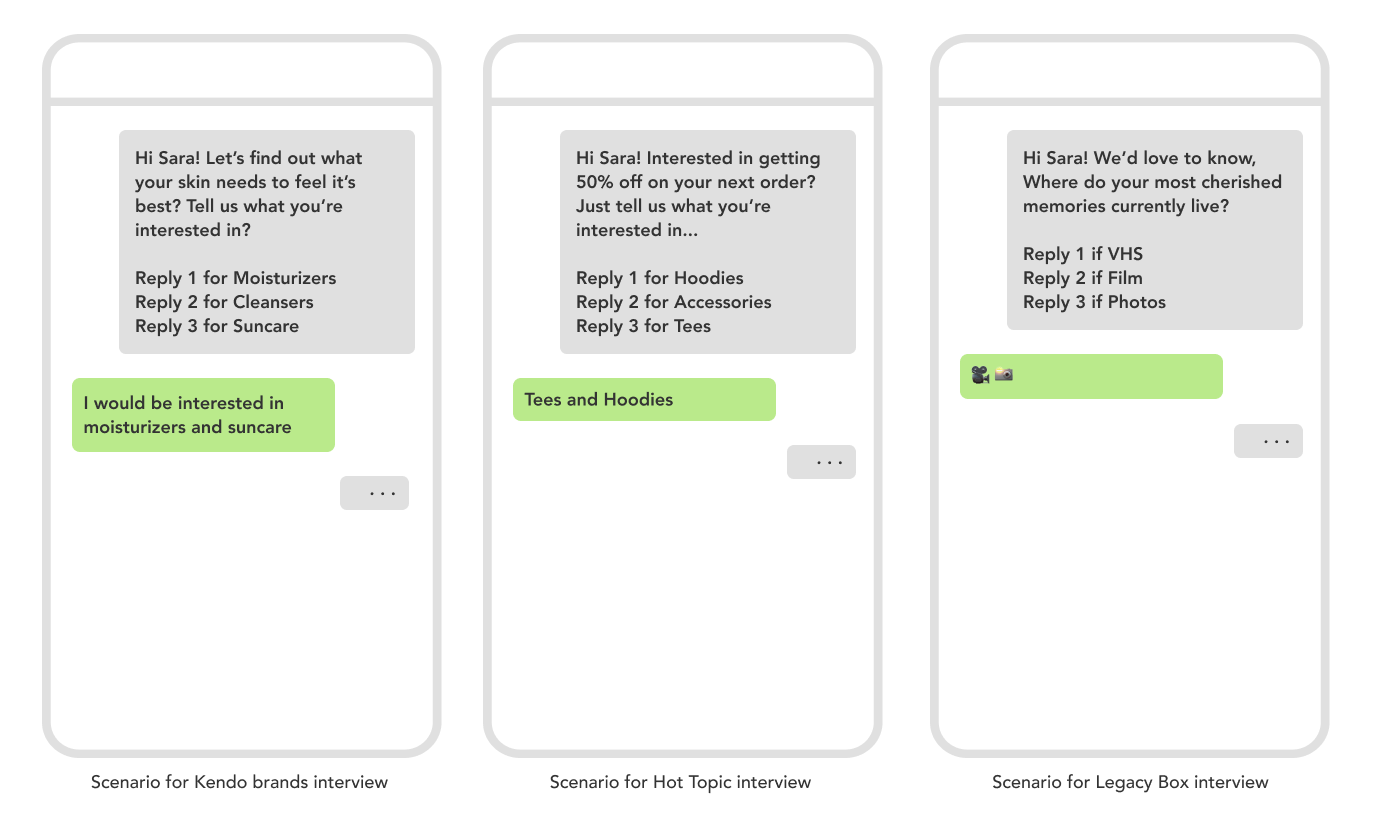
In the first round of client interviews, I really wanted to avoid leading with any kind of visuals or pre-conceived ideas for a solution. Instead, I wanted to present our interviewees with situations. I utilized hypothetical scenarios and drafted them specifically for each client and then asked them to walk me through what their expectations would be when faced with these scenarios…
Scenario 1: When the customer replies not with a prompt, but an order inquiry
All clients mentioned that they’d expect some form of CX escalation either by way of issuing a ticket or routing the customer to an order page.
Scenario 2: When the reply is outside of the options offered
Most clients said they’d expect some form of matching to happen followed by an automated response.
Scenario 3: Multiple replies outside of the specified format
Most clients felt a reasonable response would be to honor their answers and then ask which one they’d like to see first. Most felt that nudging users to reply with the specified format could potentially be frustrating for them.
Insights
Automation is a partner
Clients believe there’s value in having both automation & human agents with each addressing different needs. Small teams saw autoresponse as a way to help them sort through the noise, while larger teams saw it as a way to free up CX resources.
Meet clients where they are
Those utilizing CX platforms like Zendesk or Gorgias prefer to have the automation run through their own setup to avoid having to log into the Attentive platform.
Authenticity matters
There were concerns that autoresponses could come across as too automated or unnatural. Clients would like to have control over brand voice and tone — many even mentioned that their customers believe there is an actual person texting replies.
Common reply types
Responses that come in typically fall into one of 3 categories: mistakes or accidental inputs, order information, and on rarer occasions, product details.
Location
When asked where one would access auto-replies, people often cited several places instead of one. Tied at the top were: Autoresponse on its own tab, or from Journeys. Other locations included the Conversations tab, Campaigns, and Segments.
Use cases
FAQs, promotions, quizzes and other forms of data collection were some of the common applications that people thought autoresponse could be useful for.
Takeaways
Based on these insights, the following conclusions were made:
Keywords can either be created ad hoc or more intentionally based on the use case
Keywords should have some form of fuzzy matching vs. exact match
Should be accessible in the UI in order to track what keywords there are and where they’re being used
Being able to apply rulesets to keywords would be beneficial
This is a sample preview — the full case study write-up for this project is coming soon.